Ready before treatment
Set the consent, preparation and patch-test checks each service requires. Review appointment readiness before the client arrives.
Checks beside the appointment
In Managed: Clinical governance on Growth
See how it works->
Booking and clinic software for beauty and aesthetics
Managed keeps bookings, consent forms, payments, messages and marketing in one place. Starter and Growth add AI that answers enquiries, prepares campaigns and handles everyday admin. Review drafts and confirm changes before they happen. Start free, and we’ll move your data across at no cost.
£0 subscription. No card needed. Free migration on every plan.
Tuesday’s diary
2 appointmentsAlex Example
Cut & finish · with Jamie
Robin Example
Consultation · with Taylor
Alex Example
Client record
Alex’s consultation form
Consultation form
Completed
Saved with Alex’s client record.
Read the answers before the appointment. Your practitioner reviews them and makes the treatment decision.
Explore the diary, client record and form. These client details are invented.
Built for beauty and aesthetics businesses
Beauty and aesthetics businesses lose time in the gaps between tools. Keep the next step visible while your team focuses on the person in front of them.
Take deposits at booking and set your reminder and cancellation preferences.
Send forms before the visit and keep the completed answers with the client record.
Starter and Growth add AI help with replies and phone calls, using the business information you approve.
See the freed-up time and contact a waiting client or campaign audience yourself.
Arrange the next visit at checkout and use follow-up tools when they are due.
From the first booking to the next one, keep the work connected across your diary, client records and follow-up.
A free, mobile-friendly booking website with your services, prices and branding. Clients can book when it suits them.
Included with Free
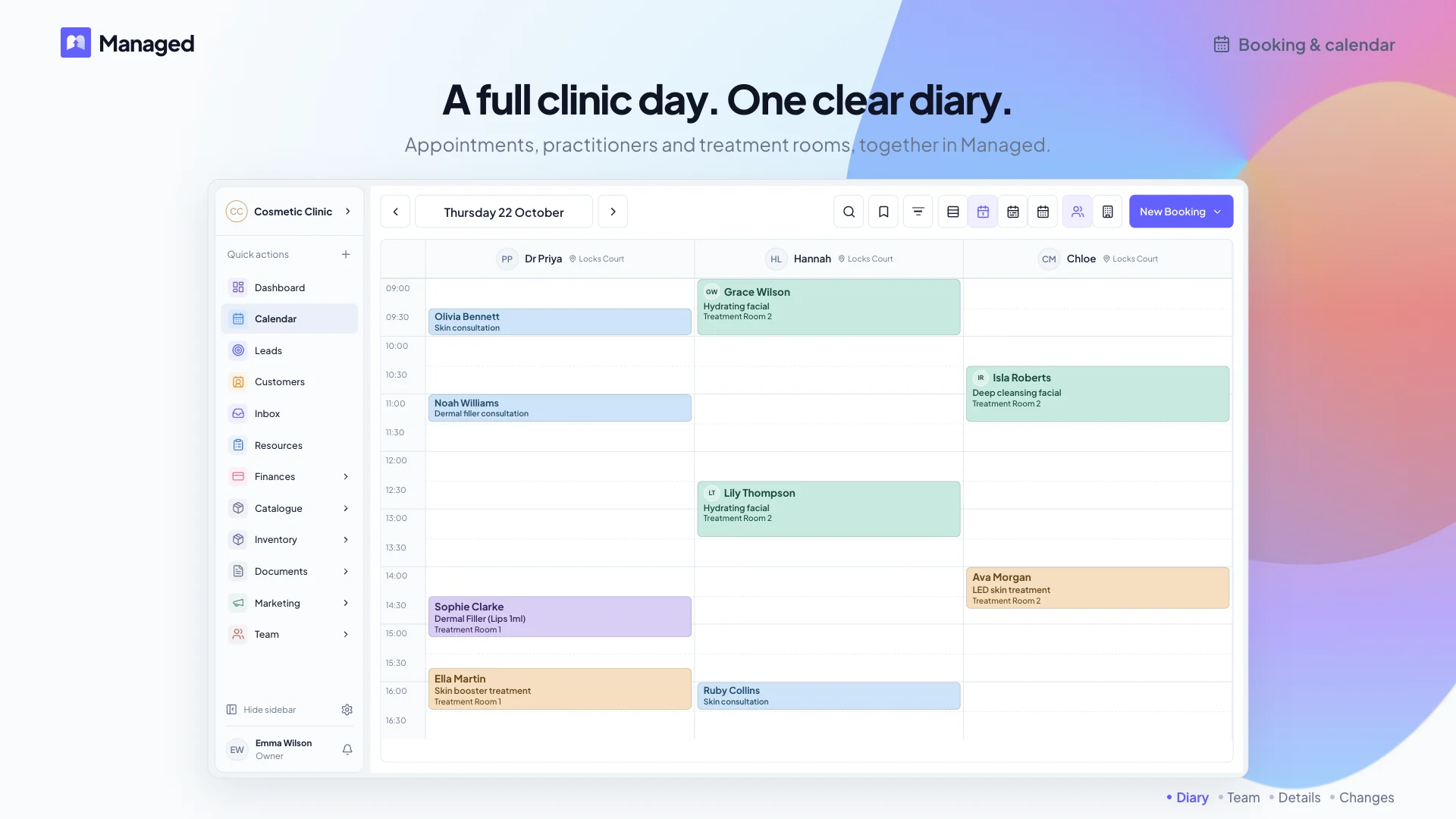
Schedule services and appointments, with team, room and equipment tools as your business grows.
Solo diary on Free; team and resource scheduling on Starter and Growth
Set SMS and email reminders and your cancellation preferences. Included message credits and extra usage charges apply.
Available on Free; message credits apply
Send consultation and consent forms, collect signatures and keep responses with the client record.
Included with Free
Take deposits or full payment at booking, send payment links and review payments alongside appointments.
Available on all plans; processing and Managed fees apply
Rebook at checkout and follow up with campaigns. Add segmentation, loyalty, memberships and AI tools as your business grows.
Manual campaigns on Free; advanced tools on Starter and Growth
Booking, website, forms, records and reminders are included with Free. Team tools, inbox, AI, memberships and loyalty require Starter or Growth; clinical governance, procurement and workforce management require Growth. Payment, message, phone and provider charges may apply.
See how your team prepares for an appointment, wraps up the visit and follows up afterwards.
Example day
Before the visit
Choose the service, team member and time. The booking stays linked to the client’s record.
Who: You or reception
Your team can open the client’s history from the appointment.
Before arrival
Send the consultation form before the appointment. Your practitioner reviews the answers and makes the treatment decision.
Who: Client and practitioner
Read the answers alongside the client’s notes.
At checkout
Save visit notes, check the payment and arrange the next appointment.
Who: You or reception
The next visit starts with their preferences and history to hand.
After the visit
Plan a follow-up campaign, reward repeat visits or offer a membership for regular appointments. Keep personal follow-up assigned to someone on your team.
Manual campaigns: Free. Loyalty, memberships and assigned follow-up: Starter & Growth. Message credits apply.
Who: Your team
Choose the clients, message and reward that suit your business. Review each campaign before sending.
Available plans: Bookings, client records, consultation forms, documents, manual campaigns and manual lists start on Free. Inbox and assigned follow-up require Starter or Growth. Clinical governance requires Growth. Payment and message charges can apply.
Choose the booking and client care tools that fit your salon, clinic or studio.
See colour notes and service timings before the appointment. Take payment and arrange the next visit from your diary.
Read consultation answers alongside treatment notes. Keep consent and aftercare with the client’s record.
Have client preferences and consultation answers ready before each visit. Keep the next appointment linked to the client’s record.
Keep forms and treatment notes with each client, ready for their touch-up visit.
Keep treatment checks, stock traceability and staff credentials alongside the appointment. Clinical governance, procurement and workforce management require Growth.
Set the consent, preparation and patch-test checks each service requires. Review appointment readiness before the client arrives.
Checks beside the appointment
In Managed: Clinical governance on Growth
See how it works->
Track product batches, expiry dates and usage through clinic stock and treatment workflows.
Trace stock and product use
In Managed: Procurement on Growth
See how it works->
Keep qualifications, renewal dates and service permissions visible to the people planning work.
Treatment permissions
In Managed: Workforce management on Growth
See how it works->
Keep sign-off, completed checks, incidents and follow-up connected to the patient record.
Clear clinical history
In Managed: Clinical governance on Growth
See how it works->
A receptionist, marketing assistant and analyst working from your business information and live records. Managed AI is included with Starter and Growth. Your team reviews drafts and confirms changes; phone and message charges may apply.
When you enable and connect it, answer calls using approved prices, services, hours and policies. It can help verified callers with bookings after they confirm the exact change, capture callback requests and pass complex questions to your team.
Give callers a clear next step
In Managed: Starter or Growth; phone setup and usage costs apply
Explore AI Receptionist->
Prepare a campaign for a quiet day or clients due to return. Review the audience, wording and message cost before approving a send.
Review every campaign before sending
In Managed: Starter or Growth; message credits apply
Explore AI Marketing->
Ask about bookings or business performance, or prepare a client note or website update. Review the draft and confirm an exact booking change before it is saved.
Get help with everyday admin
In Managed: Starter or Growth; role permissions apply
Explore AI Copilot->
Find conversations waiting for attention and prepare a reply with client context. Your team reviews and sends it.
Keep replies with their client context
In Managed: Starter or Growth; connected channels require setup
Explore AI Inbox->
Managed was created by people who spent years answering messages between clients, chasing forms after hours and watching work slip between tools that did not connect. We built a system to bring those everyday jobs together, then added AI to help with the admin.
Keep booking, client care and follow-up connected so teams can spend more of the day with clients.
Your Free workspace includes a hosted website, bookings and consultation forms. Add paid tools when your business needs them.
Add your services and opening hours. Keep each booking linked to the client’s history.
Create forms and review responses on your phone with Managed Forms. Share a link before the visit and keep answers with the client.
Starter and Growth include AI copilot help with bookings, client notes and website updates. Review drafts and confirm exact booking changes before they are saved.
Starter & Growth
Moving from Phorest, Pabau, Faces, Consentz, Fresha, Treatwell, Timely or Booksy? Review what can move, then plan the change with your team. Migration is free on every plan.
Tell us which system you use and what you need to bring across. We will review the export and plan next steps with you.
Compare the tools, costs and records that matter to your business.
Bring your booking and switching questions to a demo focused on your working day.
Practical reading for no-shows, cancellation policy and growing an aesthetics clinic.
Use diary settings and reminders to cut missed appointments.
Fill cancelled slots with a waitlist your clinic controls.
Write a policy that keeps clients returning.
Keep beauty clients coming back with follow-up and loyalty habits.
Practical ways automation helps aesthetics clinic teams day to day.
Browse the full blog for salons and clinics.
Create your Free workspace, add your services and try your first booking. Book a demo to see how Managed fits your salon or clinic.